
Date: August 29, 2025
TL;DR
Build an instant (button) Power Automate flow that:
- Lists rows from Dataverse using an OData filter (not FetchXML).
- Pages up to large thresholds (e.g., 50,000) while selecting only the columns you need.
- Updates rows inside a parallelized Apply to each (degree up to 50) with no cross‑item dependencies.
Use this to backfill at scale, safely rerun until the list returns 0 rows, and keep each run lightweight.
Why this exists
If you work in Dataverse long enough, you’ll be asked to backfill or re‑stamp tens or hundreds of thousands of records—contacts, accounts, activities, you name it. Doing that with default settings is painfully slow. The “Bulk Updater” below is a baseline pattern you can save, clone, and tweak in minutes for any client or environment.
What you’ll build
- An on‑demand Instant flow you run as needed; easy to rerun until it returns 0 rows.
- List rows with OData filtering and Pagination (not FetchXML) to pull big result sets efficiently.
- Select minimal columns to keep payloads tiny (usually just the GUID + whatever you truly need).
- Update each record in a parallel for‑each (up to 50 concurrent updates) for high throughput.
- Filter out already‑processed records so repeated runs only catch what’s left.
Step‑by‑step build
1) Trigger: Instant cloud flow (manual)
Flow type: Instant cloud flow → Manually trigger a flow.
Why: You’ll often run this once (or a few times) during historical backfills. It’s safer and more controllable than scheduled for your first pass.
Below is the end result, simple on the surface, a lot of horsepower under the hood.

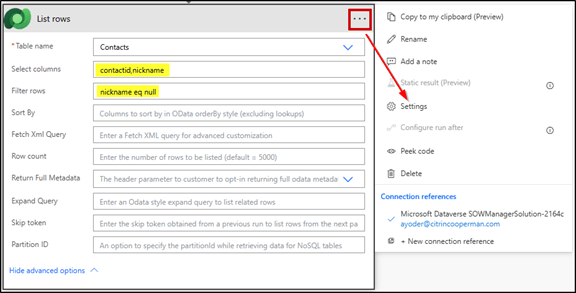
2) Action: Dataverse List rows (use OData, not FetchXML)
Table name: your target (e.g., Contacts).
Filter rows (OData): If needed,build with XrmToolBox → FetchXML Builder (Power Automate helpers) to convert a view into OData filter syntax. FetchXML caps out at 5,000 rows.
Select columns: only what you’ll use (e.g., contactid, and maybe 1–2 columns referenced by your update logic).
Order by: optional; omit unless you truly need a deterministic order.
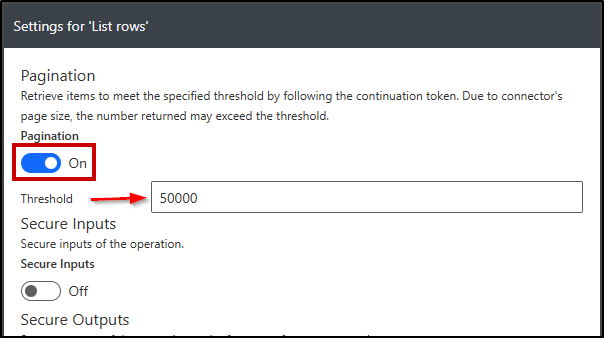
Settings → Pagination: On, Threshold: set high enough for your job (e.g., 50,000).
Common OData examples (use what matches your scenario):
— Only records with a NULL target field (great for reruns):
new_targetfield eq null
— Only active contacts that haven’t been backfilled yet:
statecode eq 0 and new_backfillcomplete ne true
— Date fence (e.g., backfill only older records):
modifiedon lt 2024-12-31T23:59:59Z
Performance tip: The biggest win people miss is Select columns. Pulling the full entity nukes throughput and accelerates throttling. Keep it surgical.
3) Action: Dataverse Update a row inside Apply to each
- Row ID: map to the GUID from List rows (e.g., contactid).
- Set only the one field (or the bare minimum) you need to update.
- If you’ll rerun the flow, consider stamping a boolean or date (e.g., new_backfillcomplete = true or new_backfilldate = utcNow()), then use that in your OData filter next run to auto‑exclude already updated rows.
 4) Parallelism/Concurrency Control (the big speed lever)
- Apply to each → Settings → Concurrency control: On
- Degree of parallelism: up to 50 (the max).
- Use parallelism only if each update is independent (no cross‑row dependencies).
When not to use parallelism: If your update relies on the output or order of other items (e.g., sequential numbering), keep concurrency off or redesign.


Rerun strategy (finish until zero)
Design your Filter rows to exclude items you already touched—usually via NULL checks or a backfillcomplete boolean. Then simply rerun the same flow until List rows returns 0 records. That’s your green light that the backfill is complete.
Snippets you can paste
Minimal Select columns (contacts):
contactid,new_targetfield
Filter only nulls (safe to rerun):
new_targetfield eq null
Exclude already processed:
new_backfillcomplete ne true
Date fence + null check:
new_targetfield eq null and modifiedon lt 2024-12-31T23:59:59Z
Set the update field (example mapping): Update a row → new_targetfield = “Backfilled” (or a computed value). Optionally also set new_backfillcomplete = true or new_backfilldate = utcNow().
Tips, guardrails & gotchas
- Do no harm first: Build and run in a sandbox. Put the flow in a Solution so you can version, clone, and move it.
- Start small: Test with a tight OData filter (e.g., a subset) before widening and or limit you List rows action to one row while testing.
- Payload discipline: Only 2–3 columns across tens of thousands of rows can be the difference between minutes vs. hours.
- Retry policy: In Update a row → Settings, consider Retry policy: Fixed, Count: 3, Interval: 20s to smooth transient throttles.
- Run windows: If the tenant is busy, run off‑hours and/or break the job into slices (date ranges or A–Z segments).
Useful variations
- Date stamping: set new_backfilldate = utcNow(); filter future runs with new_backfilldate eq null.
- Enum migrations: filter old option set value; update to the new value.
- Field copy: include both fields in Select columns; map source → target on Update a row.
- Chunked passes: run multiple slices (A–F, G–M, N–Z) to reduce timeouts and share load.
FAQ
Why not FetchXML? List rows with OData + Pagination + Select columns is more controllable and performant for giant sets. FetchXML pages differently and often returns more columns than you need.
Is 50,000 the hard limit? Practical ceilings depend on tenant service limits, connector behavior, and throttling. Start with 50k, measure, then adjust threshold + concurrency.
Can this create records? Yes—swap Update a row for Add a new row. For migration‑scale creates, consider Dataflows or the Data Migration Tool for even better throughput.
 YoderCoder
Leave a comment